Terratags Update: Advanced Pattern Validation, Multi-Provider Support, and Enhanced Reporting

Since my initial blog post about Terratags in May 2025, the project has evolved significantly. What started as a weekend project to enforce basic tag presence on AWS resources has grown into a tagging validation tool with advanced pattern matching, multi-provider support, and updated reporting capabilities. Some of you reached out and opened issues/enhancement requests around some of the featureset currently available v0.4.0.
What’s New: Major Updates Since v0.1.0
The latest version of Terratags (v0.4.0) introduces several features that address some of the enhancement requests that came my way:
1. Advanced Pattern Validation with Regex Support
The most significant addition is pattern validation - the ability to validate not just tag presence, but also tag values using regular expressions. This addresses a gap where teams need to enforce specific naming conventions, email formats, or business rules for tag values. I was talking to a customer who wanted something similar few months back to match up to their CMDB naming standards and so on. It did influence some of the work here.
Before: Simple Presence Validation
required_tags:
  - Name
  - Environment
  - Owner
  - Project
Now: Advanced Pattern Validation
required_tags:
  # Strict environment values
  Environment:
    pattern: "^(dev|test|staging|prod)$"

  # Valid email for ownership
  Owner:
    pattern: "^[a-zA-Z0-9._%+-]+@[a-zA-Z0-9.-]+\\.[a-zA-Z]{2,}$"

  # Project code format
  Project:
    pattern: "^[A-Z]{2,4}-[0-9]{3,6}$"

  # No whitespace in names
  Name:
    pattern: "^\\S+$"

  # Simple presence validation (no pattern)
  Team: {}
2. Multi-Provider Support: Beyond AWS
Terratags now supports additional providers, significantly expanding its utility:
AWS Cloud Control (AWSCC) Provider Support
The AWSCC provider uses a different tag format than the standard AWS provider:
# Standard AWS Provider
resource "aws_s3_bucket" "example" {
  tags = {
    Environment = "prod"
    Project     = "demo"
  }
}

# AWSCC Provider
resource "awscc_apigateway_rest_api" "example" {
  tags = [{
    key   = "Environment"
    value = "prod"
  }, {
    key   = "Project"
    value = "demo"
  }]
}
Terratags now handles both formats seamlessly, with automatic detection and validation.
Azure Providers Support
Support for both azurerm and azapi providers:
# Azurerm Provider
resource "azurerm_resource_group" "example" {
  name     = "example-resources"
  location = "West Europe"

  tags = {
    Environment = "Production"
    Project     = "Terratags"
  }
}

# azapi Provider with default_tags support
provider "azapi" {
  default_tags = {
    Environment = "Production"
    Project     = "Terratags"
  }
}
The azapi provider even supports default_tags similar to the AWS provider, making tag management more consistent across cloud providers. The issue related to this is kept open as I learn more about the Azure side of providers in Terraform.
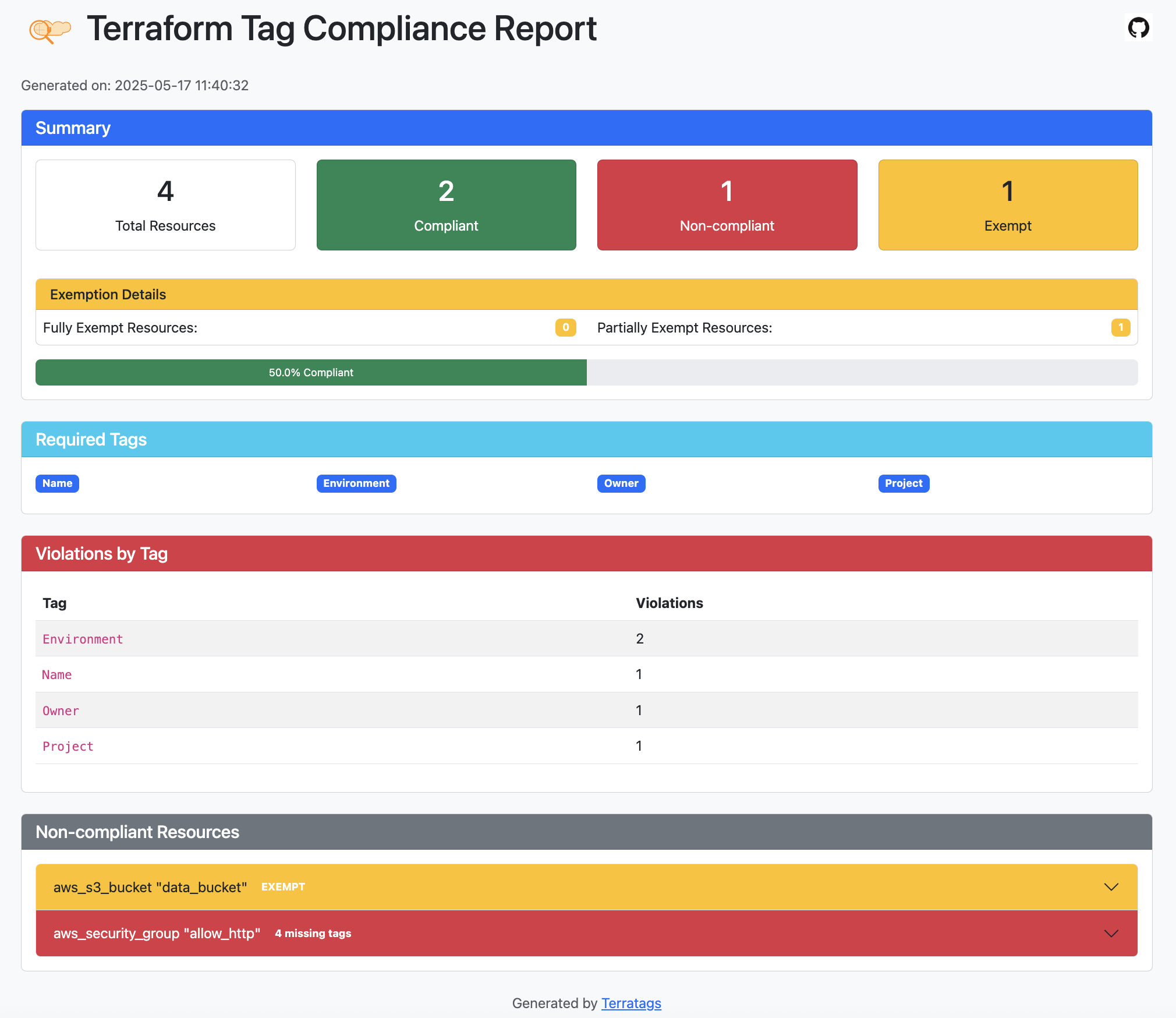
3. Enhanced Reporting and Visualization
The HTML reporting system has been modified with:
- Visual indicators for compliant, non-compliant, and exempt resources
- Detailed breakdown of tag status for each resource
- Tag source tracking (resource-level vs provider default_tags)
- Exemption details including reasons for exemptions
- Summary statistics including exempt resources
- Tag violation counts by tag name
4. Pre-commit Hook Integration
As much as I like to take credit for thinking about adding a pre-commit hook integration, I didn’t have it in my list of things to do initially. But making this available across the hooks space makes it a lot more valuable and it was easily justifiable.
repos:
  - repo: https://github.com/terratags/terratags
    rev: v0.4.0
    hooks:
      - id: terratags
        args: [
          --config=terratags.yaml,
          --exemptions=exemptions.yaml,
          --remediate
        ]
This enables automatic tag validation before commits, preventing non-compliant resources from entering your codebase.
Real-World Pattern Examples
Environment Validation
Environment:
  pattern: "^(dev|test|staging|prod)$"
- ✅ Matches:
dev,test,staging,prod - ❌ Rejects:
development,production,DEV,Test
Cost Center Format
CostCenter:
  pattern: "^CC-[0-9]{4}$"
- ✅ Matches:
CC-1234,CC-5678,CC-9012 - ❌ Rejects:
CC123,CC-12345,cc-1234
Project Code Format
Project:
  pattern: "^[A-Z]{2,4}-[0-9]{3,6}$"
- ✅ Matches:
WEB-123456,DATA-567890,SEC-123456 - ❌ Rejects:
web-123,PROJECT,ABC-12
Email Validation
Owner:
  pattern: "^[a-zA-Z0-9._%+-]+@[a-zA-Z0-9.-]+\\.[a-zA-Z]{2,}$"
- ✅ Matches:
devops@company.com,team.lead@company.com - ❌ Rejects:
username,user@domain,@company.com
Backward Compatibility and Migration
One of the key design principles for these updates was maintaining backward compatibility. All existing simple configurations continue to work unchanged:
# This continues to work exactly as before
required_tags:
  - Name
  - Environment
  - Owner
You can migrate to advanced features incrementally:
# Mixed format - gradually add patterns
required_tags:
  Name: {}  # Just presence validation
  Environment:
    pattern: "^(dev|test|staging|prod)$"  # Pattern validation
  Owner: {}  # Just presence validation for now
Future Roadmap: What’s Next
- Add Google provider support.
- Review any open issues with module level validation.
If you’re new to Terratags or want to upgrade:
Installation
# Using Homebrew (recommended)
brew install terratags/tap/terratags
Basic Usage with Pattern Validation
- Create a configuration file with patterns:
required_tags:
  Environment:
    pattern: "^(dev|test|staging|prod)$"
  Owner:
    pattern: "^[a-zA-Z0-9._%+-]+@[a-zA-Z0-9.-]+\\.[a-zA-Z]{2,}$"
  Name: {}
- Run validation:
terratags -config config.yaml -dir ./infra -report report.html
- Set up pre-commit hooks:
repos:
  - repo: https://github.com/terratags/terratags
    rev: v0.4.0
    hooks:
      - id: terratags
Resources
- GitHub Repository: https://github.com/terratags/terratags
- Documentation: https://terratags.github.io/terratags/
- Pattern Matching Guide: https://terratags.github.io/terratags/pattern-matching/
- Pre-commit Integration: https://terratags.github.io/terratags/pre-commit/
I’d love to hear about your experience with Terratags, especially how you’re using the new pattern validation features. Feel free to reach out with feedback and suggestions !